macOS has been updated to 26 It's, But there has been no change in support for third-party input methods,Latest Xcode 26 Destroyed the method I had been using before - directly changed the compilation path to /Library/Input Method If you do this now, xcode will report an error,Because the framework the project depends on will no longer be written to this directory.。
Only after removing all settings that change the compilation directory can the compilation be successful.。I guess it's because the new version of SPM no longer respects the Xcode project output directory setting... Anyway,The method I have been using for several years no longer works.,Have to get a new one。
New debug solution
Many people say that macOS third-party input methods cannot be attached directly.,This will cause the system to freeze。Actually not,Since the last time Apple updated the macOS third-party input method architecture, there has been no problem.。Just don't switch to Xcode with attach。So revert to traditional compilation → copy app to /Library/Input Method →Log out of the system →View print in the system terminal. This process is absolutely unacceptable.。
According to Gemini 3 suggestions,First of all, the method I have been using really doesn’t work anymore.,After returning to the default compilation path,You can use post script to kill the current process and move the compiled app to the input method directory,This solves the app location problem。
It is noteworthy that,Cannot use Xcode's run script, Because that's part of the compilation,No matter how you set the order,Xcode will be executed before linking and signing,In this way, the app you copied will be in an unfinished state., It won't work。
The solution is to edit the project's scheme, Add script to post-actions of build:
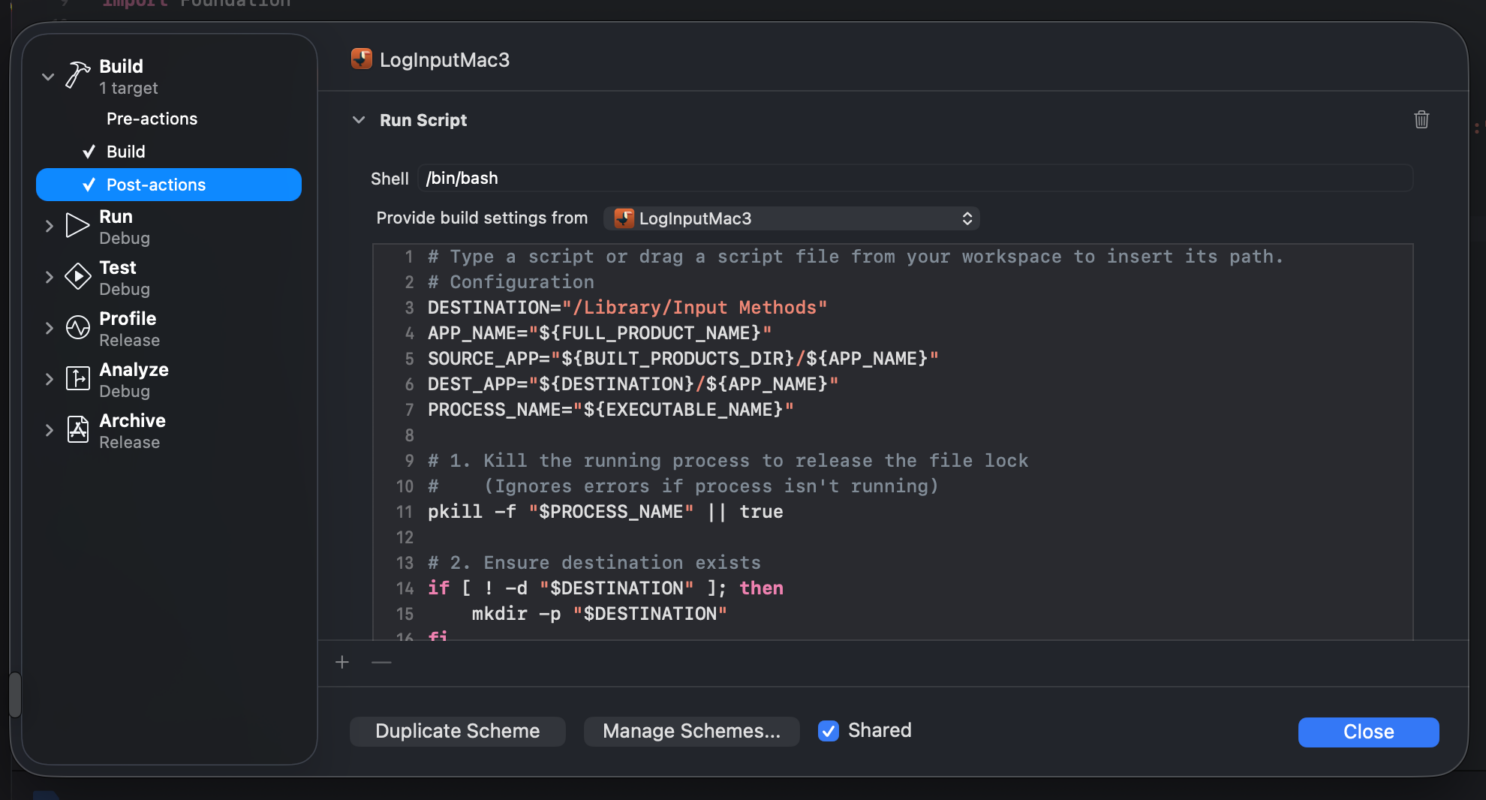
Be sure to select “Provide build settings from” as your target, If it is the default none,will not contain the project’s environment parameters.。In this way, the script cannot find the path of the app.:
# Type a script or drag a script file from your workspace to insert its path.
# Configuration
DESTINATION="/Library/Input Methods"
APP_NAME="${FULL_PRODUCT_NAME}"
SOURCE_APP="${BUILT_PRODUCTS_DIR}/${APP_NAME}"
DEST_APP="${DESTINATION}/${APP_NAME}"
PROCESS_NAME="${EXECUTABLE_NAME}"

# 1. Kill the running process to release the file lock
#    (Ignores errors if process isn't running)
pkill -f "$PROCESS_NAME" || true

# 2. Ensure destination exists
if [ ! -d "$DESTINATION" ]; then
    mkdir -p "$DESTINATION"
fi

# 3. Use rsync instead of cp
#    -a: Archive mode (preserves symlinks, permissions, times)
#    --delete: remove old files in destination that aren't in source
rsync -a --delete "$SOURCE_APP/" "$DEST_APP/"

# 4. Critical: Remove "Quarantine" attributes
#    macOS often marks copied apps as "damaged" or "unsafe"
xattr -cr "$DEST_APP"

# 5. Tell the system the app has been updated
touch "$DEST_APP"
Then, Just solve the problem of debug attach。
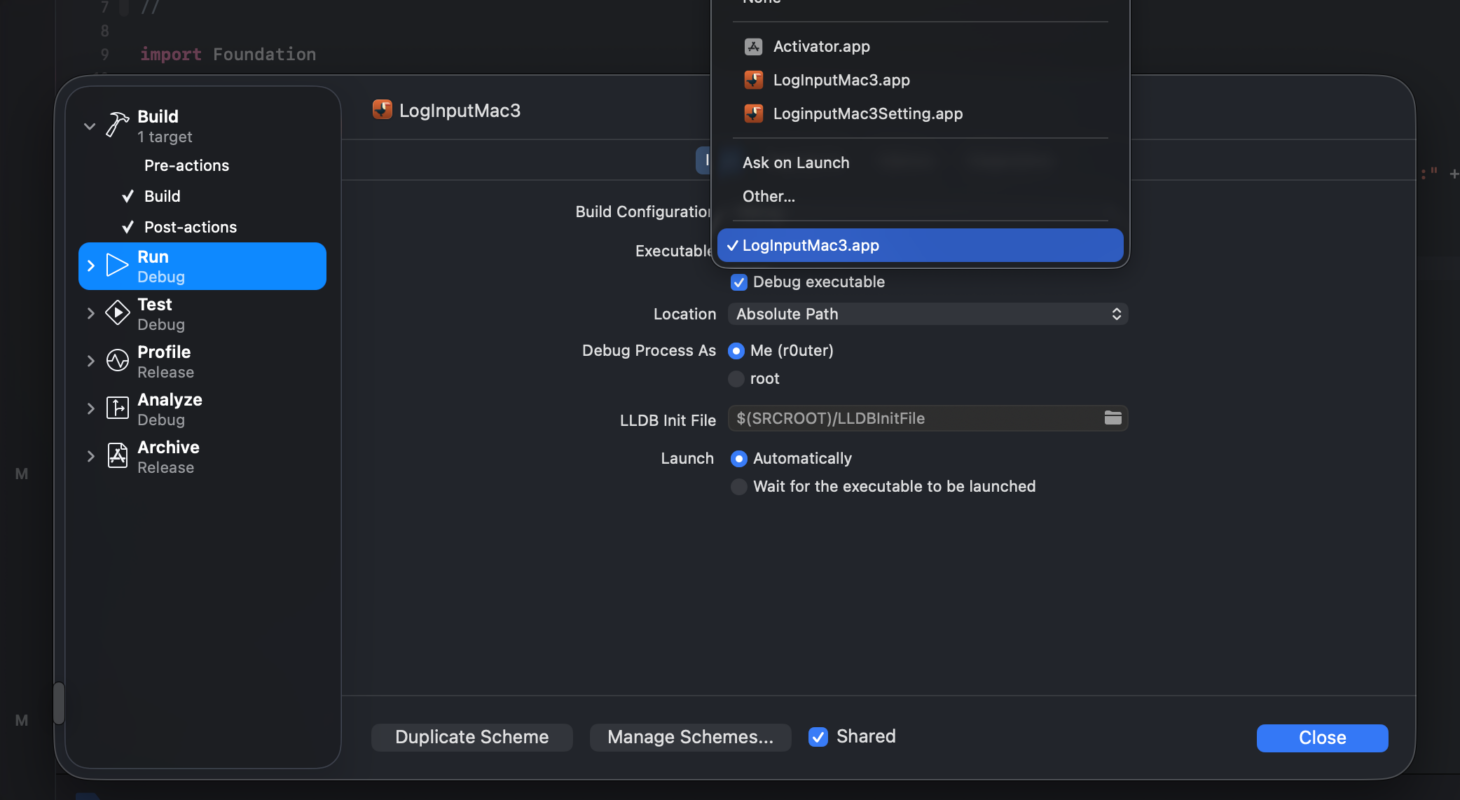
Continue to modify the scheme as well,This time it’s the run page,Here in the executable,To choose other,Then manually locate /Library/Input Method on the app in the directory,In this way, after compilation, xcode will automatically start the process from there.,Instead of system startup,All print and other debug information can still be displayed in the terminal normally.。
I have tried turning off Xcode Autoexec,Let it wait for me to start it manually。But the result is that the system starts the input method,Due to different startup identities,All the information from debugging on xcode is <private> covered。
Original article written by LogStudio:R0uter's Blog » macOS third-party input method debugging method
Reproduced Please keep the source and description link:https://www.logcg.com/archives/4196.html