Apple’s time machine is really helpful tho for the most of time it just runs in the background for nothing… till it notify you the disk for backup is running out. It kept clean up, but the free space is smaller and smaller.
BUT, instead of remove all those backups for a brand new start (which is good btw, it make sure the backup always validate with the latest version in case you really need to use it for a full recover tho), we could just go in there to manually delete the unwanted versions!
Not inside the time machine
Don’t just go into the timemachine and scroll back to past, you will never find a delete option for the files (in yeas ago, yes, it works), now, it’s much easier, just connect the disk you used for the backup, (mount the image if you backup into an image), go into the folder, and you can see those dates folder, right click and delete it!
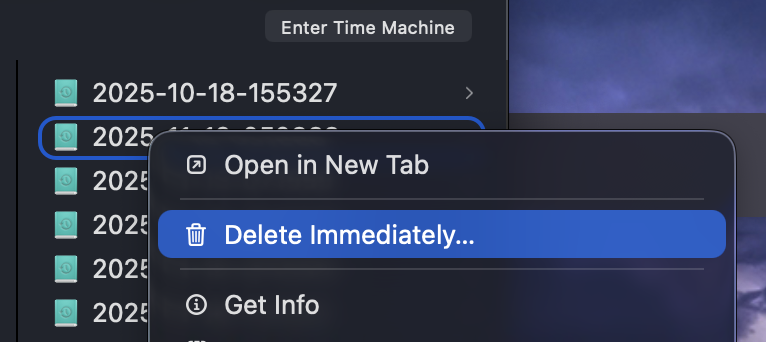
Right click inside the timemachine backup folder can delete it
What if I m using NAS?
That’s a bit tricky, but basically the same thing. The system just mounted the disk image to /Volume, However, it was hidden, so you need open the finder, and cmd+g to manually input the path, then you can see the mounted folder with name of you mac.
Original article written by LogStudio:R0uter's Blog » How to delete backups from TimeMachine
Reproduced Please keep the source and description link:https://www.logcg.com/archives/4193.html