In my previous article I said that IThe process of wearing OK glasses,throughout the process,What I find most annoying is this corneal topography map。Because this requires very expensive and huge equipment to shoot。Especially during the time when I was relying on the eye patch to press the lenses,If I could get feedback on this corneal topography every day,I can immediately tell what's wrong。Later I found out,Is there really such a solution?:https://github.com/microsoft/SmartKC-A-Smartphone-based-Corneal-Topographer/tree/main This is a project done by Microsoft Labs,Although very old,But fortunately there is detailed documentation。I successfully reproduced the results:
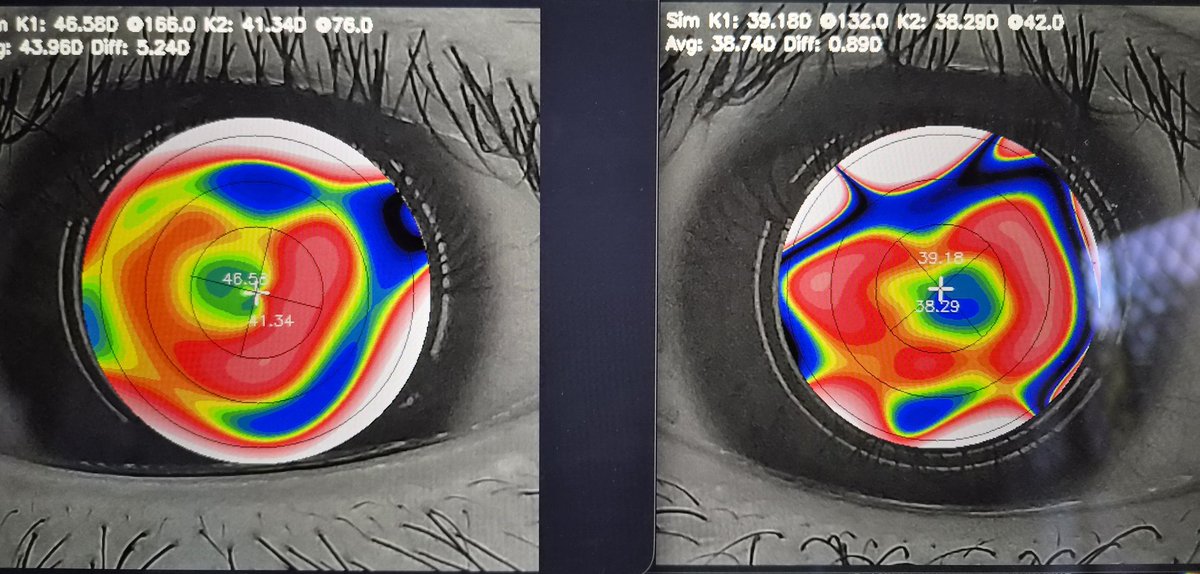
Due to mold deformation,The relatively edge location terrain is actually no reference.,But the effect of the OK mirror can still be seen relatively well in the central area.。Especially the right eye is pressed very deep and centered.,The left eye is relatively worse.。
Now I will record the entire implementation process,Hope it can help more people。
hardware
The entire project hardware opening can be divided into three parts:
- Phone
- circuit board
- 33D printed mold
Phone
This is easy to understand about mobile phones.,You need a device to take pictures。——But it’s really a bit demanding.。Because it’s about taking eyeballs,It's a close-up photo,Therefore, it is required that the default lens of your mobile phone has certain macro capabilities.。Nowadays, mainstream flagships all have telephoto lenses.,This should be noted,Otherwise, your lens won’t be able to clearly focus on the eyeballs.。
The official list of compatible devices is given: OnePlus 7T, OnePlus 6T, Samsung Galaxy A52s 5G, Xiaomi Pocophone F1, I bought a Samsung Galaxy A52s 5G,Looks like the photo at the beginning of the article。
basically,any mobile phone 1200 Mega pixels or more,And the focusing distance is 75mm or closer.。At this point if you can buy the equipment in the above list,Then there is no pitfall。(You need a phone case,After all, it is not impossible to stick the mold directly on the mobile phone, but it is not convenient to remove)
circuit board
In fact, this circuit board controls a ring-shaped LED light,it does not have any other functions。
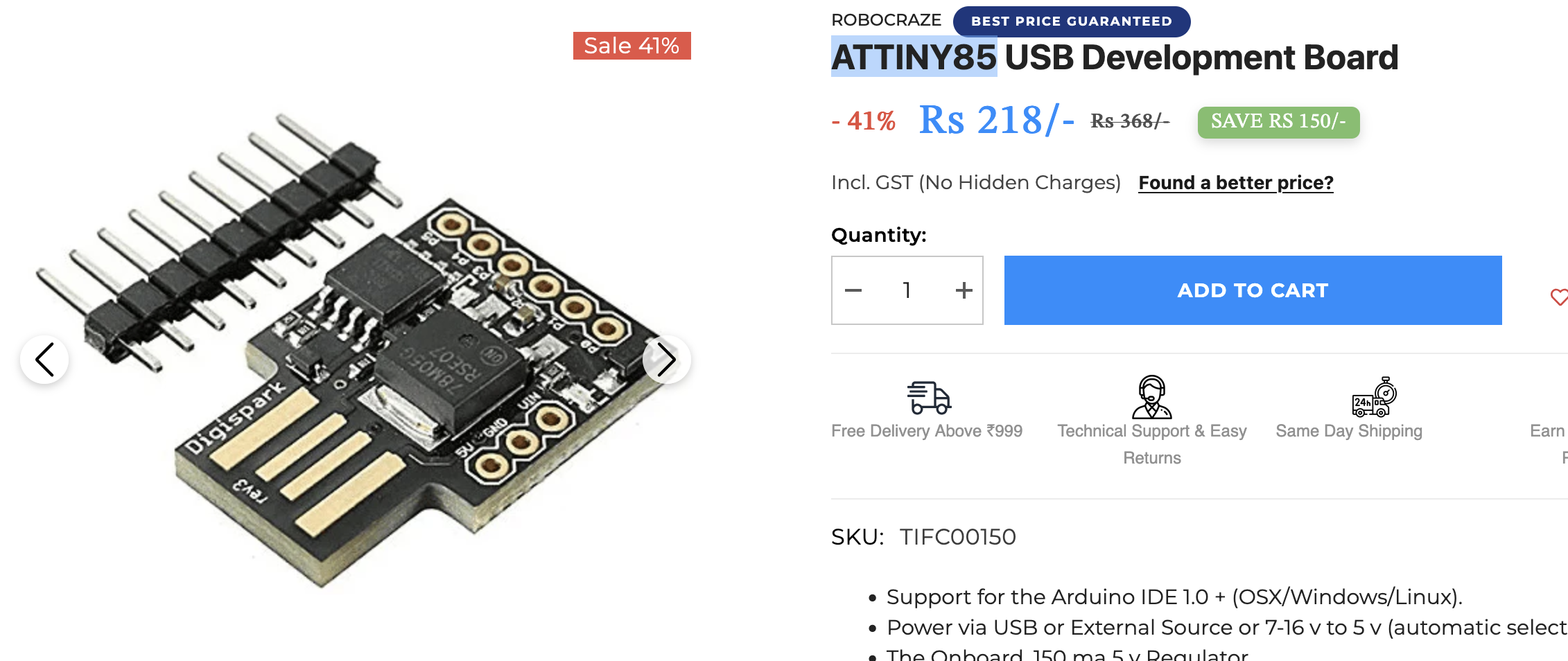
The controller looks like this (ATTINY85),I amHereBought,I searched,There is actually one on Taobao,Note that the model and appearance are exactly the same。
then the lights,I'm here toosame storeBought(WS2812 12bit rgb):
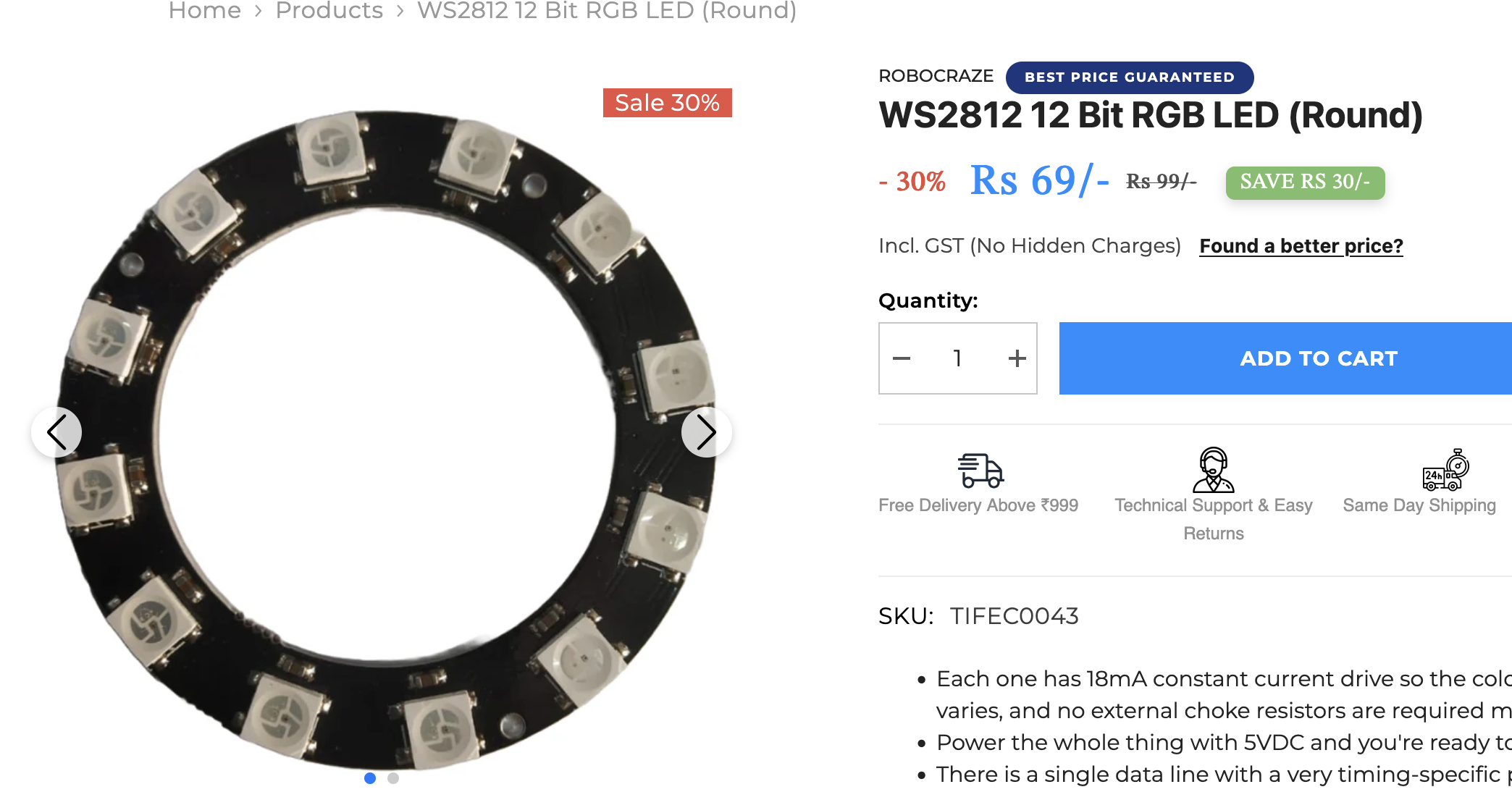
I searched and it may be a little harder to find than ATTiny85.,It cannot be directly searched on Taobao,But theoretically the model is the same,12Just a bit of color。
After purchasing, you need a little bit of soldering ability to connect them together.:
| Development board | LED light ring |
| 5v | 5v |
| grd | grd |
| p1 | d1 |
Flash code
Pay attention here,Because this board is relatively old,In my actual testing, I cannot successfully write code on a mac.。My guess is that it may be due to typec conversion.,But it cannot be confirmed。Later, after I switched to Windows,Even if plugged into usb3 interface,Can also be brushed in smoothly,A successful。
It is worth noting here that,The link given in the official tutorial http://digistump.com/package_digistump_index.json It has expired long ago,The available link is this: https://raw.githubusercontent.com/digistump/arduino-boards-index/refs/heads/master/package_digistump_index.json
After adding to Arduino IDE,No need to choose Contributed,Instead, search digis directly,Click to install。
Mold
I spent a lot of time on the mold,Ordinary printers cannot print this mold very well.。There are two difficulties,One is that many shops can only make black molds,And the diffuser (that tapered thing) needs a white light guide,need attention。The other is that the internal structure of the lens hood is very fragile,If it comes out from ordinary pla, it will be difficult to remove the supporting part.,There is a high probability that the structure inside will fall down together.。Of course in theory you could clean it further and glue it back on,It should also be usable。
I finally found this company and successfully printed it:

But unfortunately,In order to protect the structure inside the lens hood when they mail it,too much stuffing,Instead, the filler compresses the structure and deforms it.。This needs attention,You can put the diffuser on top or simply assemble the three items before shipping.。
software
The software part is a mobile app,used to take pictures。The other is a python code that performs calculations on the computer to generate terrain maps.。Because this calculation is too complex,I'm afraid it will be difficult to put them into a mobile phone and take pictures in real time.。However, SmartKC provides another solution,Just use Azure functions,Automatically upload after taking photos,functions get photos cloud computing。I don’t have this need yet,after taking pictures,I manually connected to the computer to export the photos,Calculated using python。
APP
The code can run normally,After downloading Android Studio, just open the project directory and compile it to the mobile phone.,Very rough but usable app
During the actual shooting,You need to wait for the LED fill light to stabilize white,Then shoot again。Plus it automatically takes three shots per eye,After the focus and center point are found correctly, shooting will be automatically triggered.,It is also very friendly for single-player operation。
Python
This part is more complicated,I am macOS,Apparently they did it on Windows。and,Python 3.8 Already too old,I use the current built-in macOS 3.10 Run successfully。
First configure the environment:
|
1 2 |
python3.10 -m venv .venv .venv/bin/python -m pip install --upgrade pip setuptools wheel |
Then install the dependencies,Be careful to skip here nvidia-* Related packages:
|
1 |
grep -v '^nvidia-' requirements.txt | .venv/bin/python -m pip install -r /dev/stdin |
Finally, take out your photos and the generated csv from your phone,Put it in a directory,such as user_image,then execute
|
1 2 3 4 5 6 7 8 9 10 11 |
.venv/bin/python main.py \ --n_mires 22 \ --working_distance 75.0 \ --camera_params "4.8 6.4 4.755" \ --model_file ./data/ring_distribution.txt \ --base_dir user_image \ --center_selection auto \ --mire_seg_method dl \ --mire_loc_method graph_cluster \ --output_dir output \ --verbose |
Summarize
The above are all my pitfall records.,Overall you still need to check out this complete document https://github.com/microsoft/SmartKC-A-Smartphone-based-Corneal-Topographer/blob/main/hardware/README.md The software part is relatively simple,The most difficult thing for me is to find a shop to print the mold and find a way to flash the controller with a mac。Obviously,No way,You must use Windows,Don't take any more detours。
I am still communicating with the ophthalmologist,Wait and see how this result compares to their professional machines,How comparable is it?,Can it have real reference value?。If I'm free later,I will consider optimizing the Android code,There are also attempts to encapsulate and optimize the python part, etc.。
Original article written by LogStudio:R0uter's Blog » SmartKC low-cost corneal topography solution
Reproduced Please keep the source and description link:https://www.logcg.com/archives/4228.html